LexoraOS
Get started

Hotel & resort

The valet parks the car. The guest finishes the stay pass. Then your board.

Arrival to departure, in that order. Hotel check-in on Terminal — phone, plate, the car. The guest picks nights and adds Wallet on the text. They do not scan a sign to start. Ops sees the card the second the car is parked.

11 chapters · valet, then guest, then ops · no signup

The valet

01The valetValet phone

Before the first car, they punch in

The night starts on their phone, not a binder. Clock in from Terminal. You can require that punch before Valet even opens. Break and clock-out live on the same screen. If the staff map is on, Location must be Always — no punch without it.

  • Clock in, break, clock out — on the phone they already carry
  • You can block the valet board until they punch
  • Location updates about every two minutes on duty, pauses on break, stops at clock-out
Valet phoneClock in from the schedule, break, clock out · Watch page
02The valetValet phone

The guest arrives. Hotel check-in — not a walk-up ticket.

Phone, plate (scan), optional photo, type and color. Swipe parks the car and texts the stay-pass link. The valet does not take their name or nights at the curb. The guest is not scanning a QR. If that plate already has a stay pass, it opens the guest — no second invite.

  • Phone and plate — photo and color if you have them
  • Park and text the stay pass. They finish name, room, and nights on the phone
  • A plate you already know opens the guest, not a new ticket
Valet phoneAttendant checks the car in on Terminal · Watch page
03The valetValet phone

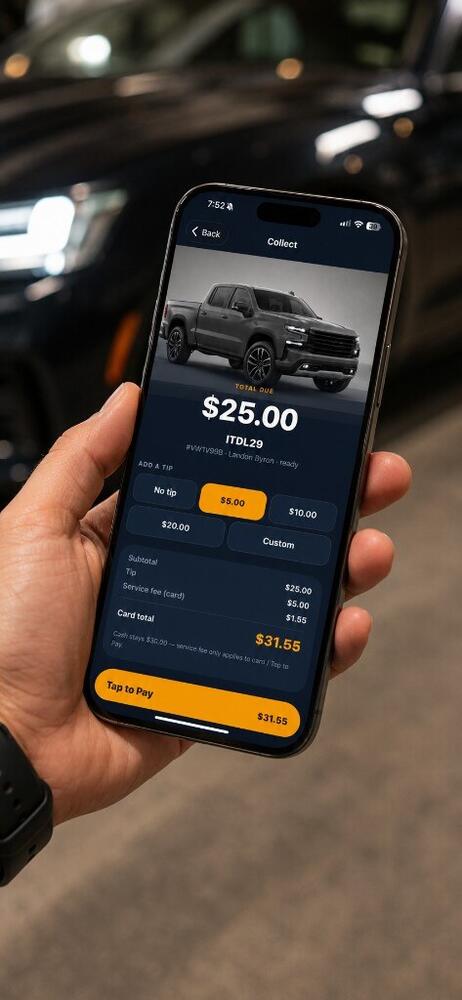
They want the car. Scan the pass, bring it, tip at the curb.

Return visits scan Wallet. Requested, retrieving, and ready sit at the top of Terminal. Start retrieval, mark the car at the stand. Handoff still takes a tip even when the stay is complimentary or already paid. That is departure.

  • The same four statuses the guest and ops see
  • Tip at handoff even if the stay is waived
  • Scan the stay pass to open that guest
Valet phoneTap to Pay at the curb with tip and texted receipt · Watch page

The guest

04The guestGuest phone

Their phone finishes the stay pass

The text is the stay-pass link, not a walk-up ticket and not “finish your membership.” Name, optional room, nights (today + checkout). Pay only if you priced the stay. Then Apple Wallet or Google Wallet — labeled Guest. No app to download.

  • Stay-pass text because the valet took their number
  • Nights on their phone — checkout date included
  • Wallet is the pass they show next time
Adding the stay pass or ticket to Apple Wallet
Guest phoneAdding the stay pass or ticket to Apple Wallet
05The guestGuest phone

“Bring my car around” from the elevator

One button, then a confirm. While the valet is moving the car they watch a live map. Changed their mind? Never mind — park it back. The Wallet pass can do the same without opening a browser.

  • Request from the text or from the pass
  • Live retrieval map while it is on the way
  • Ready pulses when the car is at the door
Guest phoneGuest taps Bring my car around and watches it come up · Watch page
06The guestGuest phone

The stay is the pass. The tip is at handoff.

Complimentary stays do not charge at join. Priced stays they already paid on the phone. At the door they can still tip — cash or card — without opening a walk-up ticket. Receipt if they paid. After the visit, a one-tap star rating.

  • Stay pass covers valet for those nights
  • Tip still lands on the valet who brought the car
  • Restaurant walk-ups are Check in vehicle — a different button
Guest phoneGuest adds a tip and pays with Apple Pay · Watch page

Ops

07OpsOps desktop

The guest is on your board the second they park

You do not wait for a radio. Four lanes — Parked, Requested, On the way, Ready — and that Hotel check-in is already in Parked as a Guest, not a Member. Above the lanes: cars on lot, average retrieval today, unpaid walk-ups, today's takings.

  • Same four words the guest and the valet see
  • You watch the stay from arrival to close without leaving the board
  • Capacity and unpaid walk-ups are on screen, not in someone's head
Ops desktopThe live valet board moving a ticket to Ready · Watch page
08OpsOps desktop

What you can do to that stay until they leave

Click the card. Edit guest, phone, vehicle, plate, parked location, keys, damage. Show the stay-pass QR if the text did not land. Advance the status, re-park, cancel. Checkout ends the stay. Tip at handoff even when the visit is waived.

  • Fix a wrong plate after they have walked inside
  • Stay-pass QR is the same code as Apple Wallet / Google Wallet
  • Checkout closes the stay — not a paper folio
Ops desktopThe live valet board moving a ticket to Ready · Watch page
09OpsOps desktop

Who was supposed to take that arrival

The week grid is how you staff the drive. You see not in yet next to clocked in. The punch is on their phone; the roster is on yours.

  • Invite staff, give a role, drop them on the week
  • Live coverage: clocked in, on break, not in yet, done
  • Hours meet tips in the pot you pay from
Ops desktopThe week schedule — who is on, who clocked in · Watch page
10OpsOps desktop

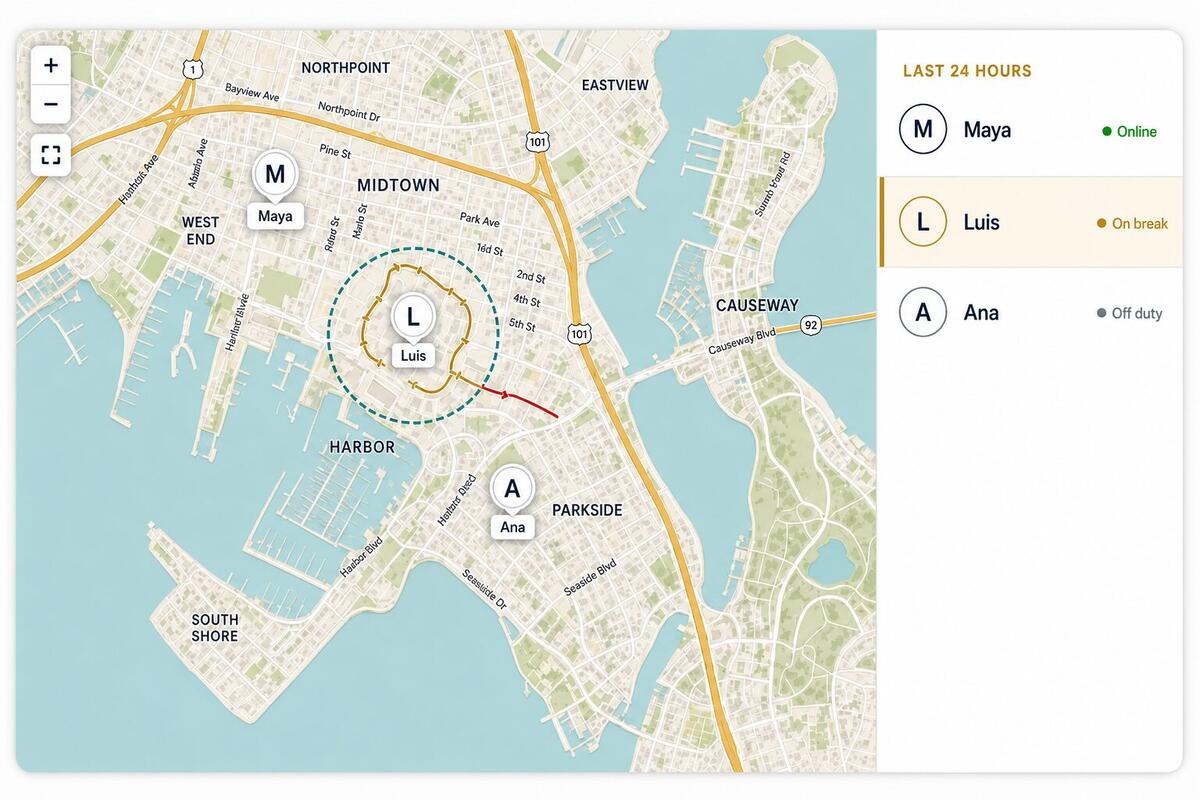
Where is the person who should be on that car

Live pins and a 24-hour trail. A working circle around the drive. On duty outside boundary when someone is punched in away from the stand. Trails stay after clock-out so you can open a name.

  • Updates about every two minutes while they are on duty
  • Color flips outside the working circle
  • Only staff managers and report viewers see this map
Ops desktopLive staff pins and 24-hour trails around the drive
11OpsOps desktop

After they leave: the night is already a report

Takings, retrieval times, guest stars, throughput. History is closed tickets for any range. Portfolio rolls unpaid, tips, staff on duty, and labor across properties. Home is the one-time setup — payments, a rate, the team — so the next arrival looks like this one.

  • One visit score ranks every attendant who touched the ticket
  • Pay wages and card tips out of the pot when it settles
  • Setup lives on Home so you are not configuring during the rush
Ops desktopReports — takings, retrieval times, guest stars · Watch page

The part nobody demos

What stops happening

  • Printing, numbering, and reconciling paper ticket books
  • Radio calls asking whether 214 is up yet
  • Wondering if the night crew is actually at the drive
  • Building next week's roster in a group chat
  • Counting an envelope of cash tips at 2am
  • Finding out Friday what Tuesday's retrieval times were

Want this on one property first?

We will set up your rates, your stand, and your branding, then run a shift with your crew watching. Month to month — keep it only if the drive is quieter.

Hotel valet software walkthrough · LexoraOS